If your Philips Indoor 360 Camera is not activating to start the pairing process find possible causes and solutions in the article below.
My Philips Indoor 360 Camera does not turn on
Published on 04 August 2024
Using the right adapter
We strongly suggest using the supplied adapter to power the camera. If you would like to use a different adapter, make sure that it has an output of either DC 5V 1.5A or DC 5V 2A. This information is usually found on the charger itself.
- Higher Amperage is Okay: Using an adapter with a higher amperage (e.g., 2.5A or 3A) is also safe and won't harm your device.
- Adapter condition: make sure the adapter you use is not damaged or broken.
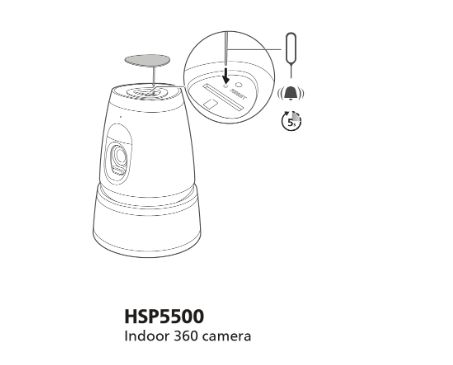
Resetting the device
To get the device in pairing mode you must reset it. Press and hold the reset button until you hear a prompt.
The device or the cable is damaged
If the device housing, adapter, or power cable is damaged, do not use them and get in touch with customer support.
Did this information help? If not, please contact our customer support for further assistance.
Did this information help? If not, please contact our customer support for further assistance.

